Real-time browser color extractor for designers and developers
PaletteLive, from PaletteLive, is a Chrome extension that simplifies color discovery inside the browser for web creatives. It helps teams inspect a site's visual language without leaving the page by offering in-context color references and quick capture tools. The extension reduces the need to switch to separate design apps during initial color checks. UI/UX designers, frontend developers, and digital marketers gain a faster workflow for visual decision-making during site reviews.
What is PaletteLive used for?
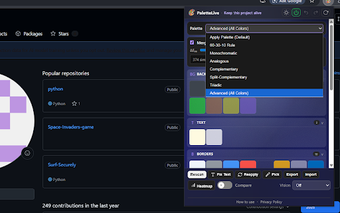
PaletteLive operates as a Chrome extension that performs live color extraction from the page you have open, letting designers inspect a site's visual palette without switching applications. The interface overlays the current tab and supports point-and-click sampling so elements can be examined in their rendered state. This behavior targets quick, in-context checks during design reviews rather than offline palette construction in separate software.
How much memory and responsiveness should you expect?
The extension advertises a lightweight footprint and runs inside the browser, which keeps additional resource demands low compared with launching standalone design programs. Because PaletteLive interacts with the page state directly, it responds immediately to page changes and sampling actions. It also supports analysing local files if the user enables access to file URLs, and community feedback highlights the extension's speed when identifying complex site color schemes.
Can you collect and use palettes in real projects?
PaletteLive stores discovered palettes in a history panel so designers can revisit saved collections without repeated sampling. It supports multiple color formats and provides instant copying of codes for pasting into design or development tools, which reduces steps between inspection and implementation. The dashboard gives a quick place to assemble project palettes before transferring them into style guides or development assets.
HEX
RGB
Best for quick color checks during visual reviews
PaletteLive suits designers and frontend developers who need immediate visual decisions while reviewing live pages; it favors fast checks over extensive asset preparation. Tip: adopt brief, page-focused review rounds to keep color choices contextual and avoid scope creep. PaletteLive is a practical match for workflows that value speed and context, while teams requiring heavy export or batch workflows should expect to complement it with other tools.
Pros
Real-time color extraction from active tabs for immediate palette capture
Instant copying of color codes (HEX and RGB) for quick use in design tools
Visual palette generation from a page's dominant colors, saved to an internal history
Available on Chrome and other Chromium-based browsers, runs as a lightweight add-on
Cons
Limited to in-browser use rather than a standalone design application
Analyzing local files requires granting the extension permission to access file URLs
Export options appear limited to code copying and internal history, not external file exports
Laws concerning the use of this software vary from country to country. We do not encourage or condone the use of this program if it is in violation of these laws. Softonic may receive a referral fee if you click or buy any of the products featured here.